

Simple Screen Recording for Technical Support
Professional screen recording and diagnostics direct from your website. Help diagnose customers issues faster with crystal-clear recordings that show exactly what they see.
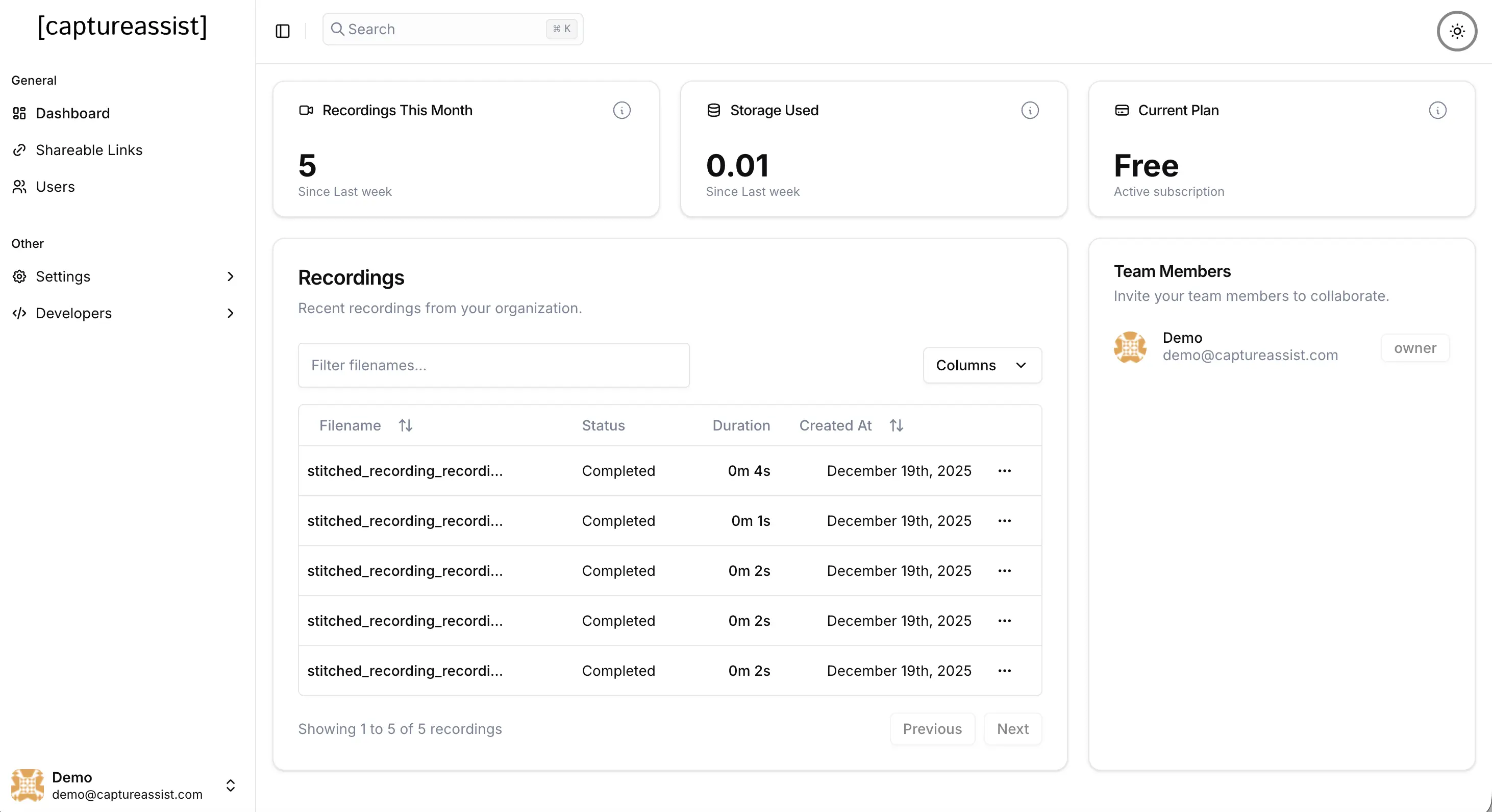
Everything You Need for Professional Screen Recording
Whether you're a technical support team that needs to find issues faster or simply want to hear feedback live from your audience, CaptureAssist is the perfect tool to help you see, understand and better serve your customers.
One-Click Recording
Users can start recording what they see with a single click. No downloads, no installations.
Real-Time Streaming
Recordings upload in real-time, with full audio capture support, giving you the best possible experience.
Link Sharing
Share a link with customers that prompts them to start recording, or integrate directly with a button on your website.
Rich Browser Metrics
Capture browser, OS, screen resolution, and device information automatically with each recording for better context.
Secure & Private
API key authentication ensures only authorized users can record. All data is encrypted in transit and stored securely.
Lightning Fast Integration
Add the widget to your site in minutes with just two lines of code. No complex setup or configuration required.
Three Powerful Ways
To Capture Screen Recordings
Send Recording Links
Create shareable links and send them directly to customers via email, chat, or support tickets. They click the link, start recording instantly—no downloads, no hassle.
- Create unlimited recording links.
- Set expiration dates for security.
- Track recordings per link.
- Perfect for one-off support requests.
Embed the Widget
Add a simple widget to your website or SaaS platform and let users easily record their screen within seconds. Prompt them to record problems, or demonstrate interactions to your team with a single click.
- Just a few lines of code to integrate
- Customizable branding & colors
- Always available to users
- Perfect for self-service support
Use the Chrome Extension
Add your API key to the Chrome extension and start recording your screen straight from the browser. Receive a shareable secure link straight after finishing the recording.
- Instant Recording
- Direct Link Sharing
- Browser direct to any Integration
- Easy one click recording.
Embed the Widget
Embed the widget on your website to allow users to record their screen, obtain both browser metrics and screen recordings within seconds.
Integrations
Save Recordings Directly to Your Favorite Tools
Seamlessly integrate with your existing workflow

Slack integration
Auto-post recordings to channels for real-time collaboration, capturing both technical data and screen recordings.
Zendesk integration
Auto-create tickets in Zendesk for new recordings, or specify the exact ticket ID to update once the customer has finished recording.

Freshdesk integration
Auto-create tickets in Freshdesk for new recordings

Google Drive integration
Auto-upload recordings to Google Drive for easy sharing and backup

Dropbox integration
Auto-upload recordings to Dropbox for easy sharing and backup

AWS S3 integration
Auto-upload recordings to AWS S3 for easy sharing and backup
Streamline your business operations with seamless integrations. Connect with Slack, Zendesk, Freshdesk,Google Drive, Dropbox, AWS S3, as well as custom webhooks.
Technical Data Collection
Our widget collects technical data from your user's browser to help us diagnose issues faster, and isolate the problem. Just a small sample of the data we capture:
Use Cases
Built for Teams Who Need Visual Communication
See how different teams use CaptureAssist to streamline workflows, improve collaboration, and deliver better results at scale.
Explain Bugs Visually to Engineering Teams
QA teams can now communicate bugs and issues with crystal-clear visual context. Instead of writing lengthy bug reports that leave room for interpretation, QA engineers can record exactly what they see—the steps to reproduce, the unexpected behavior, and the visual evidence. Engineering teams receive recordings that eliminate guesswork, reducing back-and-forth communication and accelerating bug fixes. Perfect for remote teams working across time zones, where visual communication bridges the gap that text descriptions can't.
Solve Issues Faster with Shareable Links
Support teams can dramatically reduce resolution time by sharing recording links directly in support channels like Zendesk, Intercom, Slack, or email. When a customer reports an issue, support agents can instantly send a recording link. The customer clicks, records their screen, and the support team receives a visual recording that shows exactly what's happening—no need for lengthy email threads or confusing phone calls. This workflow integrates seamlessly into existing support tools, making it easy to attach recordings to tickets and share them with team members for faster collaboration.
Explore Features and User Journeys with Audio
Product managers can now gather rich, contextual feedback by prompting users to record their journey through features with audio narration. Instead of relying on surveys or interviews that miss the nuance of real usage, product teams can watch users interact with features in real-time while hearing their thoughts, frustrations, and 'aha' moments. This approach reveals how users actually navigate products, where they get confused, and what they find valuable—insights that traditional feedback methods can't capture. Perfect for feature exploration, usability testing, and understanding user behavior at scale.
Simple, Transparent Pricing
Choose the plan that fits your team. Signup does not require a credit card. All paid plans include a 14-day free trial.
Technical Support Teams Love Us
Faster Issue Resolution
See exactly what customers see. No more back-and-forth trying to understand the problem. Recordings show the issue in context.
Better Customer Experience
Customers don't need to download anything or learn new tools. They just click record and share their screen instantly.
Centralized Management
All recordings in one place. Search, filter, and organize by customer, issue type, or date. Never lose track of a recording.
Scalable Infrastructure
Built for scale. Handle thousands of recordings without performance issues. Automatic chunking and streaming keep everything fast.
Team Collaboration
Share recordings with your team. Get second opinions, escalate complex issues, and build a knowledge base from real customer interactions.
Ready to Transform
Your Support?
Join technical support teams who are solving issues faster with screen recordings.